
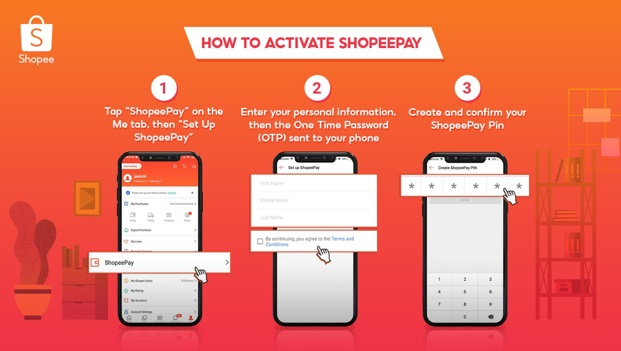
How to Activate ShopeePay:
- On the “Me” tab in the Shopee app, tap “ShopeePay” then “Set Up ShopeePay”
- Enter your personal information and the check your phone to receive the One Time Password (OTP)
- Create and confirm your ShopeePay PIN
How to Use ShopeePay
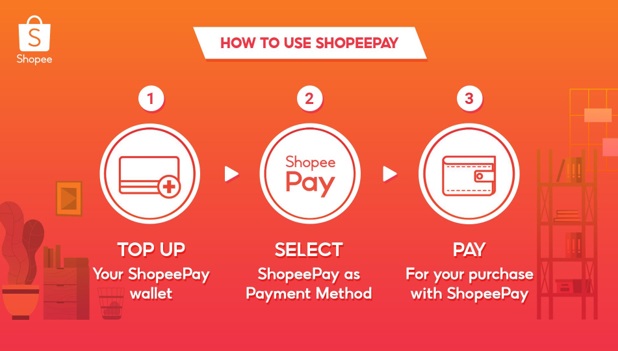
Before being able to pay for any purchases, you need to top up your ShopeePay wallet.
- Top up your ShopeePay wallet
- Tap “Top Up” and select the denomination
- Pay for your Top-Up via the available payment centers/options
Once Shopee confirms your payment, the Top Up amount will automatically enter into your ShopeePay wallet. Now your ShopeePaywallet is ready for you to use!
- Select ShopeePay as Payment Method
- After checkout, tap “Payment Option”
- Tap “ShopeePay” as the payment method
- Pay for your purchase with ShopeePay
- Tap “Confirm” to use ShopeePay for your purchase
- Your ShopeePay balance will immediately deduct the paid amount.
You can learn more about ShopeePay on this link https://shopee.ph/m/shopee-pay
REFERENCE:
Catherine Llanes
Media Relations Manager
T. +63 2-332-10-31 loc. 103
M2COMMS | M2SOCIAL | M2LIVE | PROI